
Emergency Evacuation and Mustering Roll Call — One Alert to Every Visitor Inside
VizPass sends an emergency evacuation alert to every visitor checked in, their hosts and the gate team, for the whole company or one workplace with its areas, by VizPass bell, email, WhatsApp and app push, with a log of every delivery attempt and a mark-safe roll call for Indian offices and industrial facilities.
The biggest risk during an emergency is the time it takes to reach every person inside a plant, warehouse or corporate campus. When staff, contract labour, visitors and vendors are scattered across multiple floors or buildings, a fragmented notification system can leave critical gaps and delay evacuation. VizPass narrows that gap by delivering a single press‑activated alert to every visitor currently checked‑in, their hosts and the gate team, instantly and on the channels they already use.
One‑Press, Multi‑Channel Alert to Visitors Inside, Their Hosts and the Gate Team
A single button (plus a confirm step) lets a Security Head or Company Admin send the emergency message simultaneously to the VizPass bell, by email, on WhatsApp and as a mobile‑app push – visitors get it by email and WhatsApp, hosts and the gate team on all four.
- No need to draft separate messages for each medium; the system formats the alert automatically.
- Visitors, their hosts and the gate team receive the same clear instruction, eliminating confusion.
- Contractors and temporary labour checked in on a pass are included, on WhatsApp at the mobile number taken at the gate, once your company has WhatsApp set up.
> Limit: The alert goes to visitors checked in through VizPass, their hosts and the gate team; other employees, and anyone who never checked in, will not be reached.
Delivery Log Shows Every Send, Failure and Skip
Immediately after the alert is sent, a delivery log records the status of each recipient.
- ✔ Sent – the bell, email or WhatsApp message went out to that person.
- ❌ Failed or skipped – flags a send that errored, a missing email or number, or a channel with no gateway set up.
- Real‑time visibility lets the security head prioritize follow‑up calls or physical checks.
This gives you a concrete record for post‑incident reviews; meeting safety duties such as those outlined by the DGFASLI stays with you.
Live Roll‑Call Replaces Printed Lists
Traditional roll‑calls require printed registers, manual tallying and a lot of paperwork. With VizPass you conduct a digital roll‑call directly from the live on‑site register.
- The list shows everyone alerted – each visitor inside and each host or gate‑team member – with a search and a “not yet safe” filter.
- You can mark individuals as “safe” with a single click, updating the status instantly.
- No need to print, file or later reconcile paper sheets – the data stays in the secure cloud.
This feature cuts down on admin overhead and prevents errors that can arise from manual transcription.
One‑Click All‑Clear Closes the Event and Creates an Immutable Record
When the evacuation is complete and safety officials give the all‑clear, a single command ends the emergency event.
- The all‑clear is logged with the time, who gave it and an optional note, and is sent to everyone who was alerted.
- The record becomes part of the site’s safety audit trail, useful for internal reviews and external inspections.
- The same interface that launched the alert now marks the incident as resolved, keeping the workflow seamless.
Simple Set‑Up, Integration Points and Compliance Notes
Deploying the emergency‑evacuation feature does not require a separate system or additional hardware.
- It uses the same visitor and staff database that powers pre‑registration, OTP verification and gate‑pass printing – no duplicate data entry.
- The alert uses the email and WhatsApp gateways your company has already set up in VizPass; a channel with no gateway is skipped, and the log says so.
- Phone numbers and email IDs are stored with each visit; VizPass keeps that record, and meeting your duties under the DPDP Act stays with you as the data fiduciary – see the Ministry of Electronics & IT.
For a deeper look at how this fits with other safety and visitor‑management tools, explore our features page or see industry‑specific scenarios on use‑cases. If you’re ready to see the system in action, book a walkthrough with our team.
With a single press, VizPass delivers a coordinated, auditable evacuation alert that reaches every visitor checked in, their hosts and the gate team, logs every delivery attempt, replaces paper roll‑calls and records the all‑clear—all without adding extra steps to the admin’s daily routine. This unified approach helps HR, security and facilities leaders protect people across multiple plants, factories and corporate campuses, so that everyone alerted gets the same message at the same time.
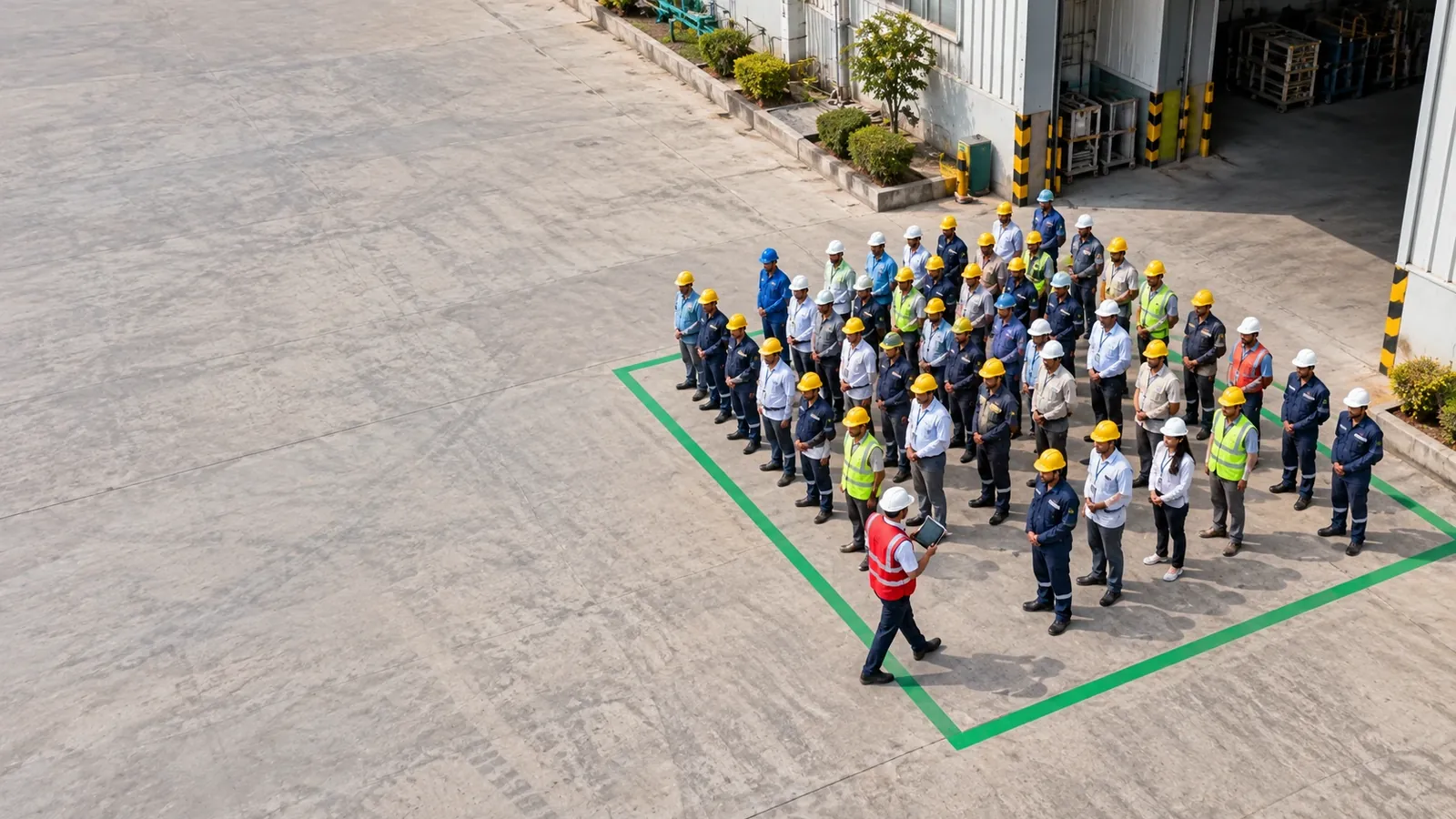
Emergency Mustering at the Assembly Point
Mustering is the part after the alarm: getting everyone to the assembly point and confirming who is safe. Because every check-in and check-out is live, the muster list is the visitors and contract labour actually inside, plus their hosts and the gate team — not a register printed hours earlier. Marshals mark each person safe as they arrive, and whoever is left unmarked is the name to search for first.
Emergency Evacuation and Mustering Roll Call — One Alert to Every Visitor Inside FAQs
How Do We Make Sure Contract Labour and Daily-Wage Workers Actually See the Evacuation Alert on Their Personal Phones?
Where your company has WhatsApp set up, the alert goes to them on WhatsApp at the same moment it goes out by email and in VizPass, so they receive it on the communication channel they use most. When a contractor or daily-wage worker checks in through VizPass, their WhatsApp number is captured in the system. During an emergency, raising the alert sends the evacuation message to that number instantly, alongside the alerts to their hosts and the gate team. They don't need to install an app, log into a portal, or wait for someone to walk around with a megaphone—the message arrives directly on their phone. However, this only works if they have checked in; people who arrive unannounced or bypass the gate will not receive the alert. The delivery log afterward shows exactly which phone numbers were contacted and which messages failed, so you can account for anyone who didn't get through and follow up manually.
If the Alert Is Sent but the Internet Drops, Will People Still Get the WhatsApp Message?
Raising the alert needs a connection: VizPass screens load from the network, and the email and WhatsApp messages are sent from VizPass's servers the moment you confirm. Whether a phone then shows the WhatsApp message depends on that phone having signal. Every attempt is logged as sent, failed or skipped, with the reason, so you know who needs a manual follow-up. Check-in needs a connection too; if the network drops, the guard keeps a paper log and enters those visits once it is back, so keep that paper log to hand for a roll call during an outage. If your office loses power or internet for an extended period, you cannot rely on digital channels alone; for guidance on business continuity during infrastructure failure, consult your local factory safety authority at https://dgfasli.gov.in.
Can We Send an Alert to Only One Building or Floor, Not Everyone on Campus?
Yes, if your buildings and floors are set up as workplaces and areas in VizPass. A Security Head or Company Admin can raise the alert for the whole company or for one workplace, and choosing a workplace includes its areas and floors. Visitors whose workplace was not recorded on their visit are alerted too, because nobody knows where they are. Someone tied to one workplace can raise it only for that workplace. The live on-site list can also be filtered by workplace and gate to see who is where. To see how this fits your facility's layout, explore our features or book a walkthrough to discuss your campus structure.
What If Someone Checks in but Then Leaves the Building—will They Still Get the Emergency Alert?
Yes, they will receive the alert if they are still marked as checked in at the moment you press the button. The system broadcasts to whoever the live register shows as currently on-site—not based on GPS or movement tracking, but on check-in and check-out records. If a visitor or contractor has not formally checked out, they appear active and will get the message. This is why checkout discipline matters: if people leave without updating their status, the delivery log may show they were notified even though they were no longer in the building, which creates a false sense of completeness. For this reason, understanding your site's check-in and check-out workflows is critical to making the alert system reliable. After the emergency ends and you press all-clear, the event is recorded with the delivery log for everyone alerted, so you can review any gaps.
Do We Need to Get Approval from a Data Regulator Before We Store Employees' and Contractors' WhatsApp Numbers for Emergency Alerts?
Whether you need any approval, and what notice you must give, depends on your privacy policy and consent practices; meeting your duties under the DPDP Act stays with you as the data fiduciary. You should ensure that all visitors, staff, and contractors understand during their first check-in that their phone numbers will be used to send critical safety alerts. For authoritative guidance on how to handle personal data for emergency use, refer to https://www.meity.gov.in (Ministry of Electronics & IT), which publishes guidelines on data governance for Indian organisations. Your legal or compliance team should review your consent forms and privacy notice to confirm they cover emergency communication. VizPass keeps the numbers taken at check-in with the visit and uses them for passes, invitations and alerts, the evacuation alert among them—the delivery log itself is an operational record of who was alerted and should be retained for safety audit purposes.
How Do We Know If the Emergency Alert Actually Worked or If Some People Didn't Get the Message?
The delivery log lists every attempt for each person alerted—bell, email and WhatsApp—so you can see who was sent the alert and who was not. After you raise the alert, the system records which messages were sent, which failed and which were skipped, with the reason. This is your record of who was sent the alert, on which channel and when. You can cross-reference the log against your live on-site register to spot anyone who was in the building but didn't receive the message, then follow up manually. When the emergency ends, you press all-clear, which closes the event and locks the log so it becomes part of your safety record for inspection or audit. Review our use cases to see how other facilities in your industry handle post-alert verification. This record is also useful for identifying communication gaps—for example, if a contractor's WhatsApp consistently fails, you know to establish a backup channel for them.
What Is Emergency Mustering?
Emergency mustering is gathering everyone at an assembly point during an evacuation and confirming who is safe. VizPass gives the muster point a live list of everyone alerted — visitors and contractors inside, their hosts and the gate team — so marshals can mark people safe and see at once who is still unaccounted for.
Further reading
- Emergency evacuation — Wikipedia
- National Disaster Management Authority — Government of India